Supercharged screenshots for coding agents
Give your agent the screenshots it needs, see the code behind any pixel, and run an agent on what you select. Runs locally.
Download for macOSFree. Pro is a one-time $19.
- Works with your agents
- Claude Code
- Codex
- Cursor
- Gemini CLI
- opencode
Built in to your notch.
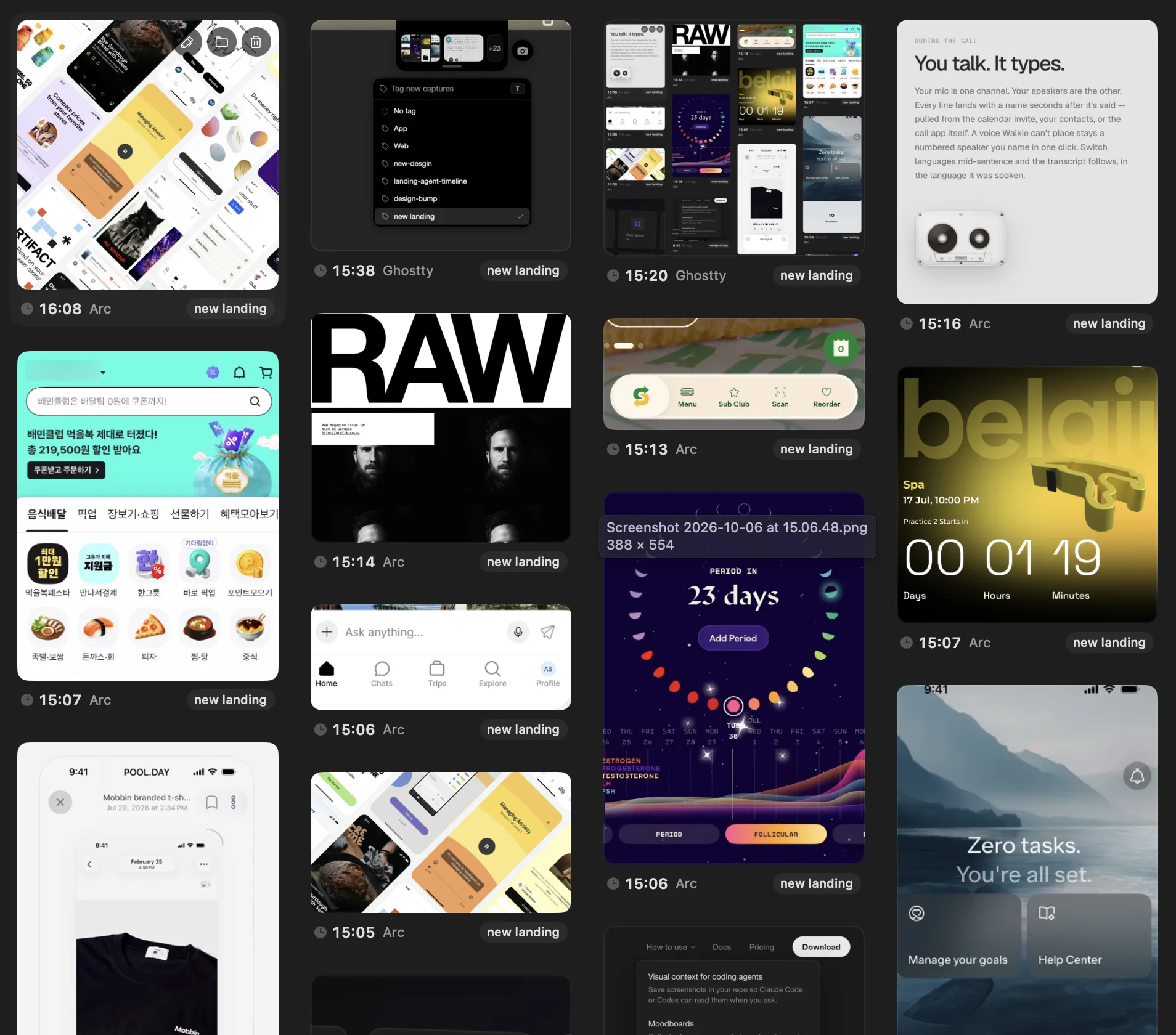
Hover the notch to see your latest captures. Click it to see every capture, switch the Project or tag, and drag any of them into your agent. Capture, Code Lens, and Inline Agent sit at the end of the strip.
CaptureFree
Screenshots your agent can read.
Capture any part of the screen and add a note. Bigshot saves it in your Project with the source app and the text recognised in the image, and adds a skill so your agent knows where to look. Ask about your last screenshot and the agent opens it.
Read about Capture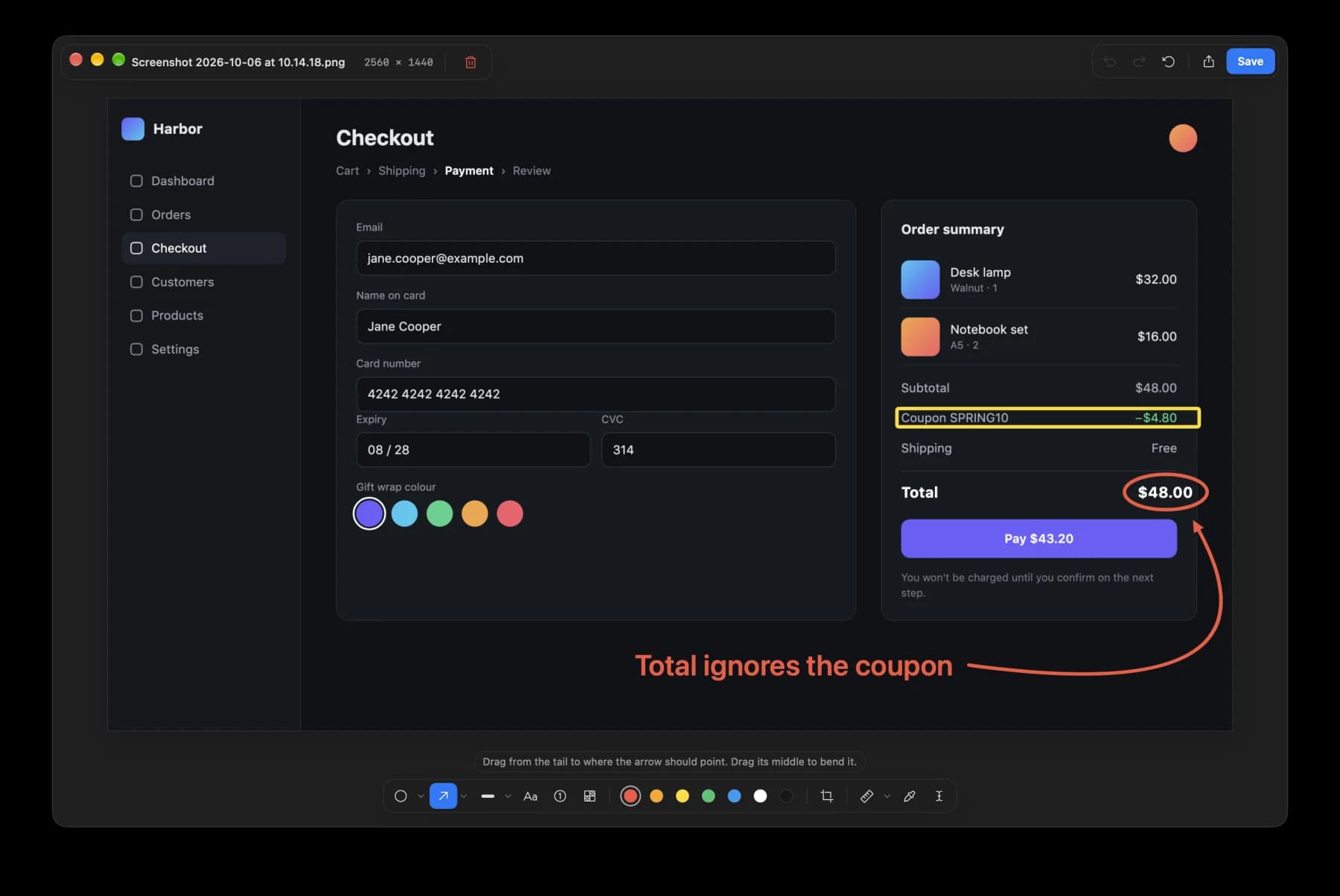
Code LensPro
Read the source of any UI.
Code Lens reads pixels, so it works on a browser, a native app, a simulator, or a terminal. Each label names the component, its file, and the line that renders it. Click a label to open it in your editor.
Read about Code LensInline AgentPro
Run an agent on what you select.
The agent gets the screenshot and your instruction, and works in your Project while you carry on. It commits on a new branch and never pushes or merges. You review the branch and merge it yourself.
Read about Inline Agent
Run an agent
It gets your instructions and the screenshot.
Add an icon and show the size of the dmg
Running✓Done · 1 commit
Add an icon and show the size of the dmg
Claude Code · bigshot/agent-dmg-size
- Readapp/download/page.tsx
- Editapp/download/page.tsx+6 −2
- Runpnpm typecheck
- Commita41c9e2 Show the dmg size
Runs locally.
Code Lens, the Code map, and text recognition run on your Mac. Your screen and your code never go to our servers.
Features
Dynamic Island app
Your Project, tag, and latest captures under the notch. Capture, Code Lens, and Inline Agent are one click away.
Read moreSmart capture
Hover a window, panel, or card and click. Edges snap, so there is nothing to crop.
Read moreCapture Frame
A box with a timer, for open menus, tooltips, and hover states.
Read moreLibrary
Every capture in one place. Search by the text inside the image.
Read moreDrag into any agent
Drop a capture into Claude Code, Codex, Cursor, or any app that accepts images.
Read more
Before you start
Does anything leave my Mac?
Yes, if you send a capture to a cloud model. Dragging it into an agent, starting an Agent Run, or running a Hook hands it to the agent or API you picked, and Claude Code, the Anthropic API, and the OpenAI API run in the cloud. If your agent uses a local model, for example opencode or Codex set up with Ollama, the capture stays on your Mac. Code Lens, the Code map, text recognition, and the optional image model always run on your Mac. Bigshot itself only contacts bigshot.pics to check your licence and for updates, and Hugging Face when you download the image model.
Which code can Code Lens match?
Code Lens works on anything on your screen. The Code map it matches against reads TypeScript and JavaScript (including JSX and TSX), Markdown and MDX, Swift (SwiftUI and AppKit), Python, and shell scripts. Code Lens matches on text out of the box; an optional on-device image model, a 390 MB download you choose to install, adds matching on icons, images, and charts.
Does Bigshot change my code on its own?
Only when you start an Agent Run. The agent works on a new branch, in a separate worktree by default, and asks you before it does anything that needs permission. Bigshot never pushes or merges; you review the branch and merge it yourself.
Which agents work?
Inline Agent uses Claude Code, Codex, Cursor, Gemini CLI, or opencode, signed in with your own account. Hooks support Claude Code, Codex, Cursor, the Anthropic API, and the OpenAI API. You can also copy or drag captures into any app that accepts images.
What is free, and what does Pro add?
Capture, the editor, the island, and the Library are free, including dragging screenshots into your agent. Pro adds Code Lens, Inline Agent, Smart capture, Projects and tags, screenshot context with OCR, and Hooks on up to 2 Macs. It is a one-time purchase of $19 at launch, then $29, with 12 months of updates. Your last covered version keeps working forever.
What do I need?
An Apple silicon Mac on macOS 14 or newer, with Screen Recording permission granted to Bigshot.
What do you want to fix next?
Select it on screen. Bigshot finds the code, and your agent takes it from there.
Download for macOSmacOS 14 or newer · Apple silicon · Free, with Pro as a one-time purchase.